









Given today's SUPER HOT $20 Amazon Gift Card from LivingSocial, I thought I would remind you all that you can add these gift certificates to your account for future use! It is really easy and you can always opt to use the credit or save it for later on your purchases! I accrue a lot of these gift codes through Swag Bucks, so it is a must that I add them to my account - this way I never forget to use them and they never get lost in my email! Remember - Amazon gift cards DO NOT expire, so no worries about rushing to use them!
So, in case you were wondering (or maybe didn't even know this was possible), here is how you can do it ...
1) Log into your Amazon.com Account

2) Click on "Your Account" in the top right corner

3) Scroll down to the "Payments" box and click on "Apply a Gift Certificate/Card to Your Account" (pictured above)
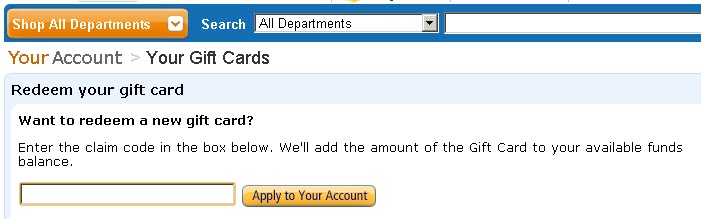
4) Enter your gift code into the box and click "Apply to Your Account" (pictured above) - your credit will be added to your account (you can see your total on the right side) and next time you check out, it will ask you if you would like to apply your credits towards that purchase - you may choose to apply them or not with each purchase.
* Don't forget to grab your $20 Amazon.com Gift Card from LivingSocial and you can test this out when it arrives!


 Posts
Posts





















0 comments:
Post a Comment
I LOVE COMMENTS!! So, go ahead, leave me one - make my day!! Don't forget to leave your email address, if you're entering a giveaway, or your blog URL, if you're a fellow blogger, so we can keep in touch!!